Preferences
Settings → Preferences holds everything you can personalize day to day — as opposed to System (right next to it), which just displays how this instance was deployed and can’t be changed from the browser at all.
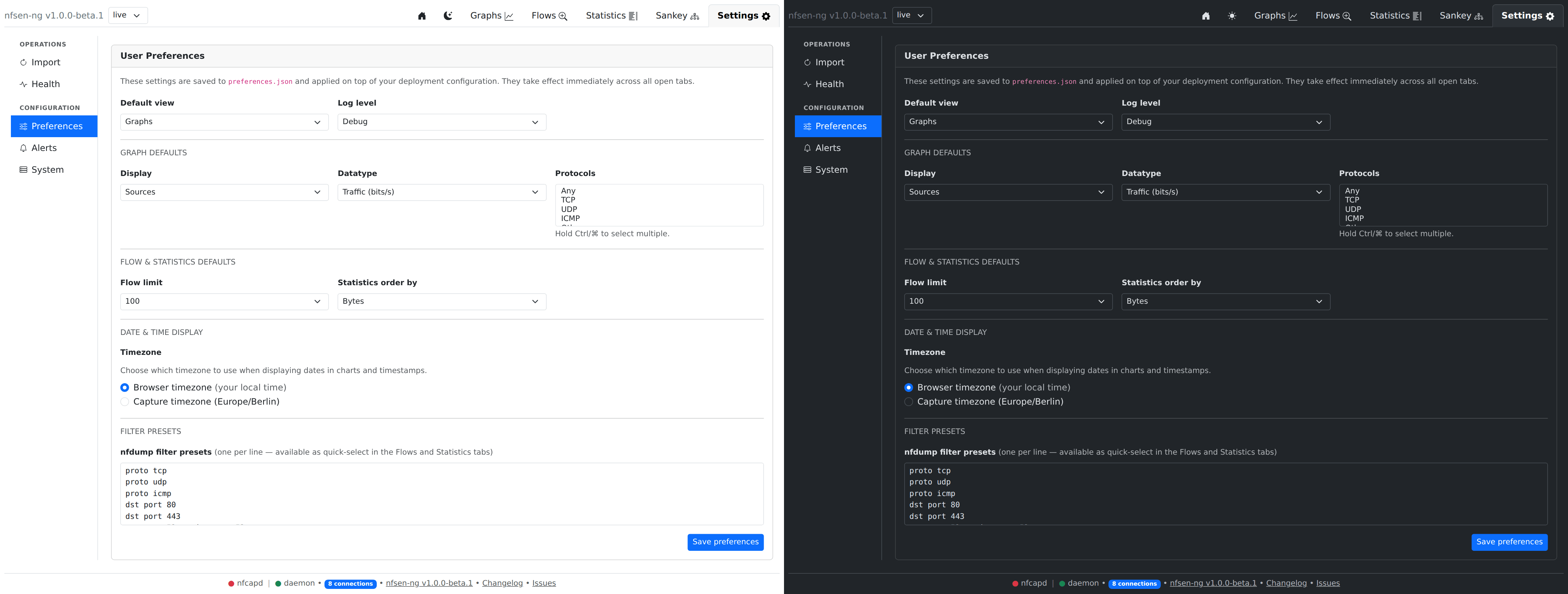
What you can change here
- Default view — which tab opens when you load nfsen-ng.
- Log level — how chatty the server’s own logs are. Leave on the default unless you’re troubleshooting something and were asked to turn it up.
- Graph defaults — the Display/Datatype/Protocols the Graphs tab starts with, so you don’t have to reselect them every visit.
- Flow & statistics defaults — default row limit and sort order for Flows/Statistics.
- Date & time display — show timestamps in your browser’s local timezone, or the server’s. Handy if you’re monitoring a network in a different timezone than the one you’re sitting in.
- Filter presets — a saved list of nfdump filter expressions, offered as quick picks in the Flows/Statistics/Sankey filter panels instead of retyping the same filter every time. One per line.
Click Save at the bottom of the section you changed — each section saves independently.
Everything else (System)
The System sub-tab is read-only: configured sources and ports, which storage backend is active, how many years of history are imported, the nfdump binary path, and so on. These come from environment variables or a config file at deploy time and need a container/service restart to change — this screen exists so you (or whoever you ask for help) can see exactly what an instance is configured with, without needing shell access to it.