Settings and Timezones
The Settings page (SettingsPage, backend/pages/SettingsPage.php) has one
editable tab, General, backed by preferences.json, and four read-only tabs
that show the deployment: Sources, Storage, Integrations (apart from
the reverse DNS switch) and System. Saving goes through SettingsActions.php.
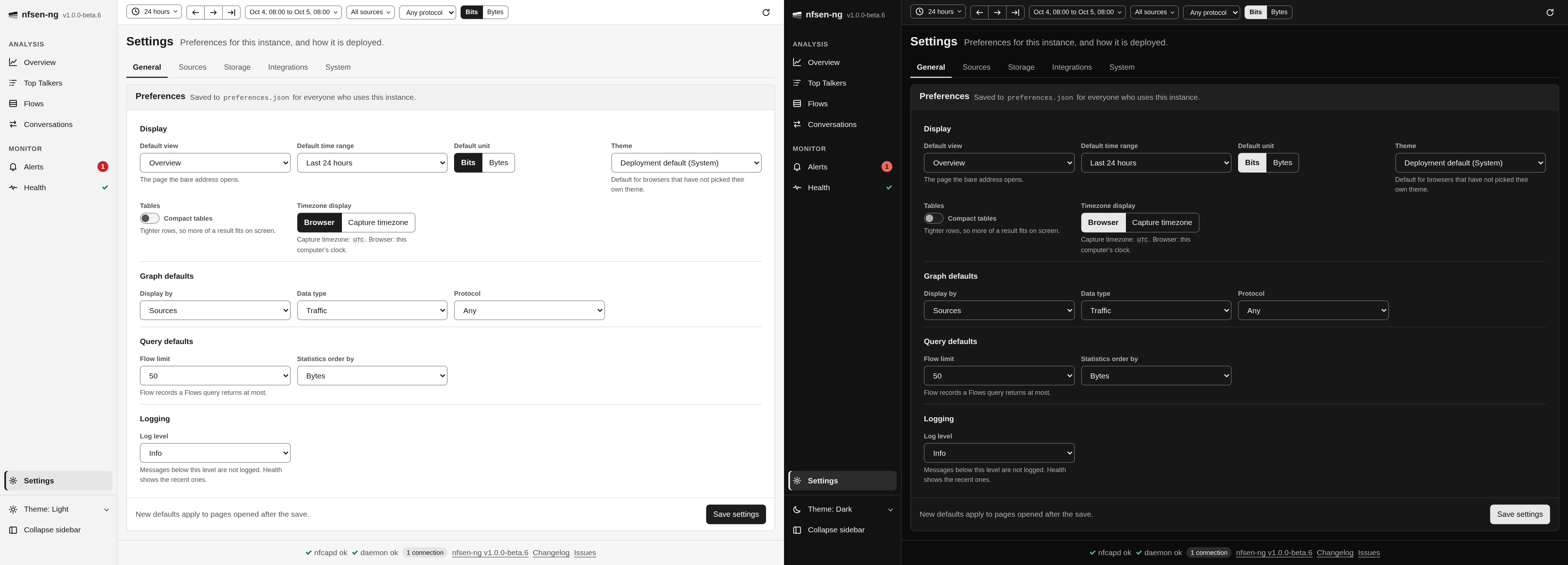
Preferences
| Section | Fields (UserPreferences) |
|---|---|
| Display | defaultView (a page id), defaultRange (1h, 24h, 7d, 30d, 1y), defaultUnit (bits, bytes), theme ('', system, light, dark), compactTables, displayTimezone (browser, server) |
| Graph defaults | defaultGraphDisplay, defaultGraphDatatype (traffic, packets, flows), defaultGraphProtocols (its first entry seeds the global protocol) |
| Query defaults | defaultFlowLimit, defaultStatsOrderBy |
| Logging | logPriority |
| Integrations | rdnsEnabled |
save-settings takes ?scope=general (the General form) or ?scope=rdns (the
reverse DNS switch); without a scope it writes every General field plus
rdnsEnabled. It merges the posted fields into what preferences.json already
holds (UserPreferences::toArray()), so the alert rules, the alert templates, the
selected profile and any field a scope does not cover are kept. It no longer
writes filter presets (those are saved filters now, see
SQLite store) or the alert templates (their own
action, save-alert-templates).
Legacy values are normalised on load: a defaultView of graphs, statistics,
sankey or investigate becomes its page id (Settings::normalizeView()), and a
defaultGraphDatatype of bytes becomes traffic with defaultUnit set to
bytes.
Compact tables sets <html data-density="compact">, which tightens every
table through the design tokens.
How preferences layer with the deployment
Configuration is applied in two stages: the deployment baseline (environment
variables, then the deprecated settings.php overlay) is built first, and
preferences.json is overlaid on top. For the fields the General tab owns, the
saved preference therefore wins over the deployment value. In particular a
saved logPriority overrides NFSEN_LOG_LEVEL; if you set the log level by
environment variable, leave the preference unsaved or match it. Everything else
(sources, ports, datasource, nfdump paths, import depth, retention, integrations)
comes only from the deployment layer and is shown read-only.
Theme
The theme comes from three layers:
- The browser’s own choice from the sidebar theme menu, in
localStorageundernfsen-theme(light,darkorsystem). Use instance default removes the key. - The instance default, the
themepreference:system,lightordark. An empty value, shown as Deployment default (…), falls through to: NFSEN_DEFAULT_THEME(auto,light,dark;Settings::$deploymentTheme).
The layout puts the instance value on <html data-theme-default>, and a blocking
script at the top of <head> resolves the three layers (and the operating
system’s prefers-color-scheme for system and auto) before the first paint,
so the page never flashes the wrong theme. <html data-theme> is always light
or dark, and the choice follows the OS live while it says system.
Read-only tabs
The Sources, Storage, Integrations and System tabs are read fresh the first time a tab renders Settings and after every save; otherwise they come from an app-wide cache that lives 30 seconds.
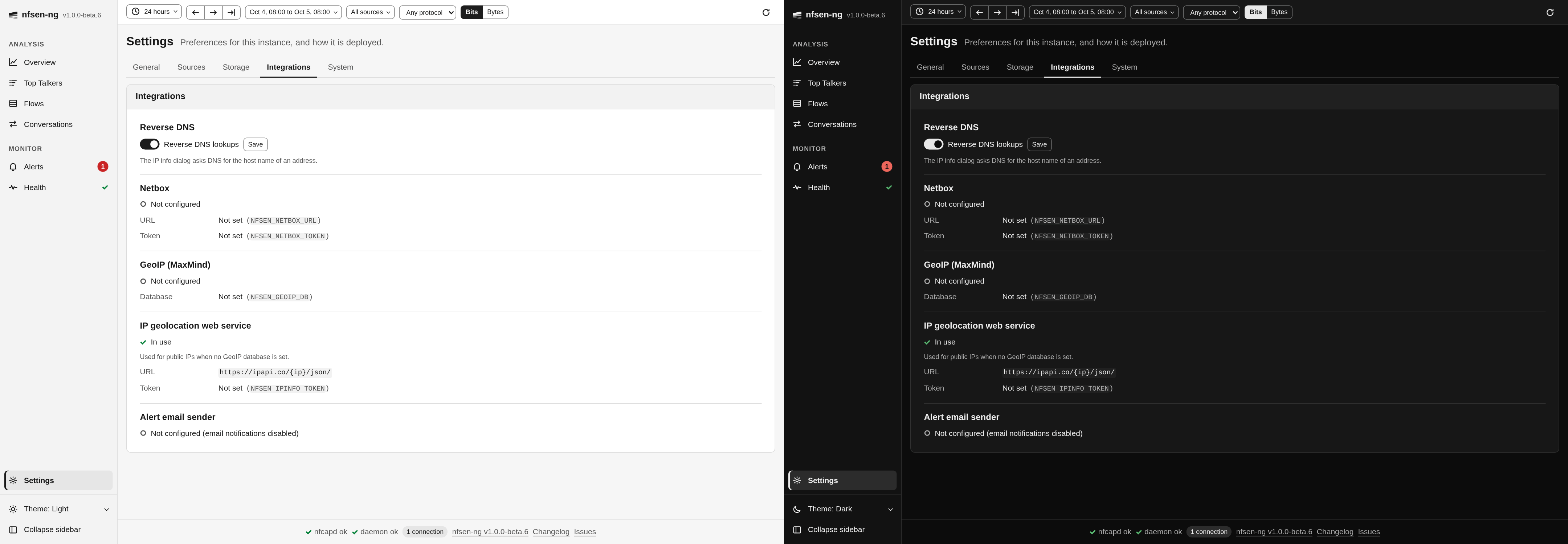
Integrations (SettingsPage::viewData()):
| Row | Source | Shown |
|---|---|---|
| Reverse DNS | Settings::$rdnsEnabled | A switch, the only editable row |
| Netbox | NFSEN_NETBOX_URL, NFSEN_NETBOX_TOKEN | Configured when both are set, the URL, the token masked |
| GeoIP (MaxMind) | GeoIpDatabase::status() | Path, database type, build date, Active or the error |
| IP geolocation web service | NFSEN_IPINFO_URL, NFSEN_IPINFO_TOKEN | In use, or standing by while the GeoIP database answers; URL, token masked |
| Alert email sender | NFSEN_ALERT_EMAIL_FROM | The address, or Not configured (email notifications disabled) |
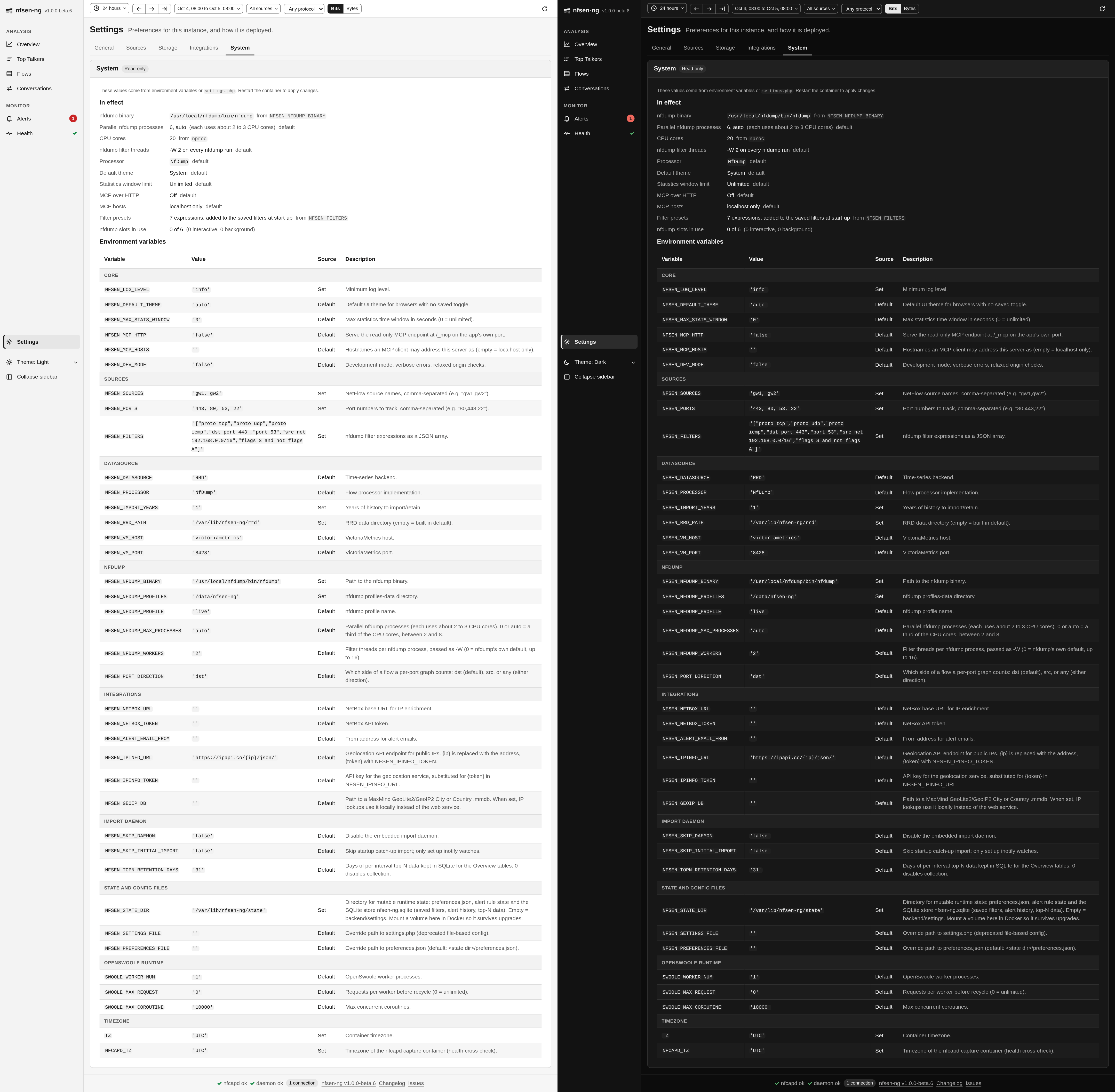
System lists the values in effect with their origin (default, an environment
variable, or settings.php), and every EnvRegistry variable by group with its
value (EnvVar::display() masks secrets), whether it was set, and its
description. When a settings.php is loaded, a notice says its values win.
In effect (SettingsPage::deployment()) includes the nfdump process budget:
Parallel nfdump processes (6, auto on 20 cores), CPU cores with the file or call
they were read from, nfdump filter threads (the -W passed), and nfdump
slots in use by class, which is counted on every render instead of coming from
the 30 second cache.
Timezones
The container runs TZ=UTC. nfcapd file names are parsed in NFCAPD_TZ if set,
the PHP timezone otherwise, independent of the display setting above. If nfcapd
runs in a different timezone than the container, set NFCAPD_TZ explicitly; the
Health page’s nfcapd file time check warns when the newest file’s name is far
from the time it was written, or in the future.
Timestamps travel as Unix epochs and are formatted in the browser, in the
browser’s timezone or, with Capture timezone, in NFCAPD_TZ
(frontend/js/components/tz-utils.js). The absolute range entry in the controls
bar reads and writes times in the same timezone.